
GUEST MODE
Share the Sens.ai Experience
Sens.ai Members can use their App and Headset to enable family or friends to do a Boost Session. This is called Guest Mode. In Guest Mode, the Sens.ai Member is the Host and the new user is the Guest.
Each month, as the Sens.ai Host, you have up to 3 Guest Mode Sessions to share with anyone you want.


What Can a Guest Do?
Your Guest can do one of these three Boosts - no need to dampen the sensors as there is no Signal Check.
- Chill
- Expand
- Prepare
Upon completion, Guests can receive a discounted headset coupon by entering their email address.
How Do I Become a Host?
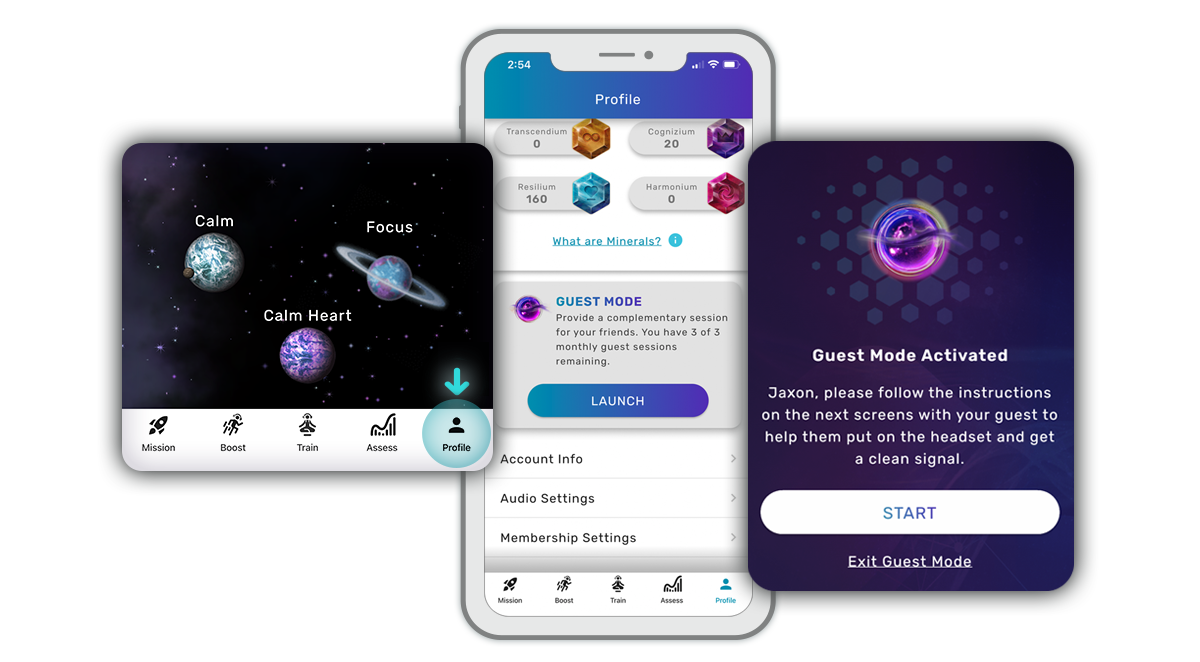
All you need to do is complete 6 Train and 1 Boost Sessions (specifically an Expand, Prepare, Snooze, Chill or Drive Boost). Guest Mode will be available the next time you log in.
- On the Profile page, there will be the option for “GUEST MODE”, select “Launch”
- “Switch to Guest mode” prompt will come up - select “Guest mode”
- “Guest Mode Activated” will pop up - select “Start”
Ready to Launch
The Guest now chooses the Boost Session they'd like to experience. Once ready:
- They will be guided to "Connect headset to App"
- Then instructed to "Put on the headset"
- They will review the Guest Mode Tutorial screens
- Then start their Boost session


